
Predictive maintenance software that warns you before the line stops.
MIE is building predictive maintenance software for manufacturing plants on the machine record it already keeps. It will use that record to warn you when a part is likely to fail, to track your monthly production goal, and to tell you the moment downtime puts that goal at risk. It is the next major feature on the MIE roadmap.
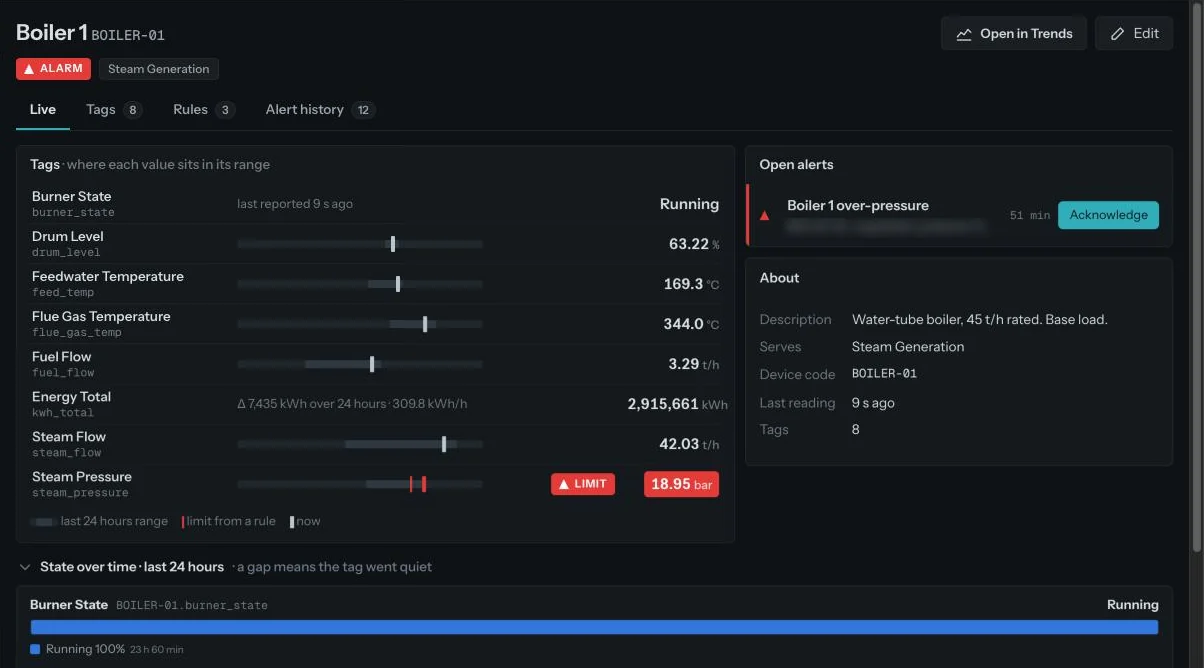
Most plants still find out when the machine stops.
Maintenance usually runs on a fixed calendar, or on nothing at all until something breaks. Both waste money. One replaces parts that were fine. The other pays for a stopped line, a rushed repair and a missed month.
Machine failure prediction works from the readings instead. If the data shows a part drifting away from how it normally behaves, the right person hears about it days before it fails. Read more in predictive vs preventive maintenance and how to reduce unplanned downtime.
- Service every machine on the calendar
- Replace parts whether they are worn or not
- Failures between services still stop the line
- Nobody records what the check actually found
- The night shift notices a stop at handover
- An urgent repair, often without the part in stock
- Lost output that the month cannot win back
- An early sign from the machine's own readings
- A plain-language heads-up to the owner
- A check booked before the part fails
- The outcome recorded, so the next warning is sharper
Five steps, every time.
A warning is only useful if someone acts on it and the system learns from what they found.
- Early sign
A reading starts drifting from its normal behaviour, well before it crosses a limit.
- Heads-up
The owner gets a plain-language message on WhatsApp, Slack or email: "Please review Turbine 2 bearing. There is a chance it may fail in the next 1–2 weeks. Take a look once."
- Acknowledged
Someone takes it and books a check, or snoozes it with a reason. Unanswered warnings climb the same escalation tiers as alerts.
- Fixed
The outcome is recorded against the machine in three taps: fixed, scheduled or nothing found.
- Learns
Every outcome sharpens the next warning for that machine and machines like it.
Built on data you can trust.
A prediction is only as good as the readings behind it. MIE already collects, checks and stores every reading at client plants. Predictive maintenance adds one more step on top.
- Collect. Readings leave each machine over HTTPS, MQTT, OPC-UA or Modbus through your gateway. No new sensors are needed.
- Check. Only known machines and tags get in. Anything else goes to the rejected-data log with the reason, so bad data never skews a warning.
- Learn normal. MIE learns the normal range and trend for each tag on each machine, from a few weeks of history.
- Spot the drift. When a reading starts moving away from normal, well before it crosses a limit, MIE raises an early sign for that machine.
- Keep learning. Every fix, schedule or "nothing found" is recorded, and accuracy improves as outcomes build up.
Know the month is slipping while you can still save it.
Example. A plant plans 2,000 units a day towards a monthly goal of 55,000. With 10 working days left, MIE shows a gap of 22,000 units. It says the goal is at risk and that 2,200 units a day are now needed, 200 above plan. The owner can act while there is still time, not at month end.
- Goal tracking. Set the plan (for example 2,000 units a day) and the monthly goal (55,000). MIE shows produced so far, projected month end and the gap.
- Stop alerts. When a critical machine stops, the owner is told straight away, with the units being lost.
- Goal at risk. When the projection falls short, MIE says so early, with how much output is needed per day from here.
- Downtime reasons. Each stop can be tagged with a reason, so the month shows where output really went.
Where it shows up in MIE.
A panel in every client summary: which machine, roughly when, how sure, and what to check first.
A health view on each machine page with warnings, acknowledgements and fixes on one timeline.
Warnings on the channels your team already uses, with acknowledge in one tap.
Predictive maintenance sits alongside the parts of MIE that are live today: plant overview, alerts with timed escalation, Ask, trends and machine pages. You can also build your own views of health and downtime with custom dashboards.
Works with the machines and systems you already run.
MIE sits alongside your SCADA or historian. It does not replace them. Your control system keeps running the plant; MIE watches the data and tells people.
- Machines and controllers. HTTPS, MQTT, OPC-UA and Modbus, from your PLC, gateway, historian or edge device.
- Business systems. SAP, Oracle, Microsoft Dynamics, SQL Server, PostgreSQL and Excel. Our team handles the mapping during setup.
- Out to your team. Heads-up messages on WhatsApp, Slack or email, and alerts on Slack, WhatsApp and webhook.
- Your data stays yours. Encrypted in transit and at rest, isolated per client and never used to train AI models. See security.
For the people who answer for uptime.
See which machine is likely to need attention, whether the production goal is on track, and what a stop is costing in units.
Get early signs with the machine and part named, acknowledge in one tap, and record what the check found.
Every stop tagged with a reason, so the month shows where output really went and which machine to fix first.
Machine builders and service teams will see the same "Likely next" panel in the client summary for each customer site. See MIE for OEMs.
Start with MIE today. Predictions build on it.
Predictive maintenance needs a few weeks of readings for each machine. Plants that connect MIE now build that history while the feature is being finished.
- Listen
Day 1. A call and a walk through your plant. We note the problems in your words.
- Map
Week 1. Machines, tags, limits, shifts and goals. We agree what "good" looks like for your plant.
- Connect
Week 2. We set up the gateway over HTTPS, MQTT, OPC-UA or Modbus. Readings start flowing and get checked.
- Prove it
Weeks 3–4. First alerts reach the right people, first answers from Ask, first client summary. Then talk to us about joining the first group of plants for predictive maintenance.
Common questions.
Is predictive maintenance available today?
What is predictive maintenance software?
How is predictive maintenance different from preventive maintenance?
How does MIE predict machine failure?
How much history does MIE need?
Do we need new sensors?
What happens if nobody responds to a warning?
Does predictive maintenance replace our SCADA or historian?
Ask the demo plant your own question.
We'll walk you through MIE on a live plant in 30 minutes.
Or call +91 98288 93692 · +91 88519 85656 · info@thinklytixai.com